
APEX BREAKOUT
Master the open. Trade the breakout.
Get the indicator
Master the open. Trade the breakout.
See the open range break before the crowd reacts.
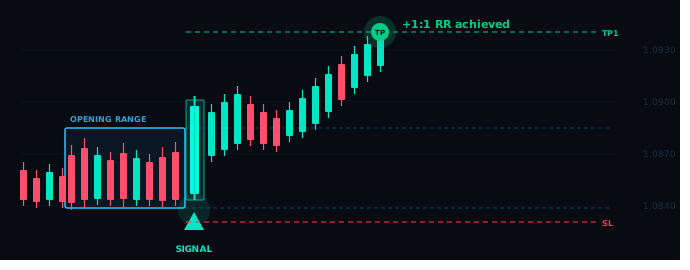
Apex Breakout highlights the market open range, flags a bullish break, and maps risk-to-reward levels directly on the chart.
European
08:00 UK
London
09:00 UK
New York
15:30 UK
Australia
23:50 UK
BUILT FOR PRECISION
Every feature earns its place
Built around ICT methodology. Each tool is designed to improve signal quality, not add noise.
Engulfing candle confirmation
Only a strong candle closing beyond the opening range fires a signal. Doji and weak bodies are filtered automatically.
Auto SL and three TP levels
Stop loss placed 1 pip beyond the session range. TP1, TP2 and TP3 drawn at 1:1, 2:1 and 3:1 risk-reward automatically.
HTF support and resistance
Previous day high, low and close plus weekly high and low drawn automatically. Signals near key levels are suppressed.
Five candle patterns
Engulfing, Marubozu, Pin Bar, Two-Bar Reversal and Fakey. Enable any combination to match your trading style.
Native Pine Script alerts
Built-in alert() calls fire the moment a signal confirms at bar close — no extra tools needed. Add a webhook to connect MT4 or MT5 via PineConnector.
Works on any instrument
Auto-detects forex, indices, gold and crypto. The exclusion buffer adjusts automatically so the filter is always calibrated correctly.
THE PROCESS
Up and running in minutes
Four steps from install to your first confirmed signal.
1
Add to your chart
Install APEX on any 5-minute TradingView chart. Works on forex pairs, indices, gold and crypto.
2
Watch the session open
The coloured range box builds live during each session’s opening hour, marking the high and low to watch.
3
Signal fires on confirmation
The first engulfing candle that closes beyond the range triggers the signal. SL and all three TP levels draw instantly.
4
Take the trade
TradingView alerts fire instantly at bar close via native Pine Script automation. Enter manually or connect a webhook to execute automatically in MT4 or MT5.
SIMPLE PRICING
Three tiers. One edge.
Start free. Upgrade when the strategy proves itself on your charts.
LITE
Free
Forever — no card needed
Session range boxes
All 4 market opens
Historical session graphics
Multi-timezone and DST
Breakout signals
SL and TP levels
HTF S&R levels
MOST POPULAR
PRO
£49/mo
or £199 one-off lifetime
Everything in Lite
Breakout signals
5 candle pattern detection
SL + TP1, TP2, TP3
TradingView alerts
5-hour signal window
Native Pine Script alerts
HTF S&R levels
ELITE
£99/mo
or £499 one-off lifetime
Everything in Pro
PDH, PDL and PDC levels
Weekly high and low
HTF confluence filter
Auto instrument detection
Native Pine Script alerts
MT4 and MT5 webhook
Priority support
All plans include a 7-day free trial · Cancel anytime · Lifetime option available on all paid tiers
FAQ
Common questions
What TradingView plan do I need?
APEX works on any TradingView plan including the free tier. However a paid TradingView plan lets you set unlimited alerts, which is useful if you want notifications across all sessions.
Which instruments does it work on?
Any instrument available on TradingView on the 5-minute chart — forex pairs, indices like FRA40 or US30, gold (XAUUSD), and crypto. The indicator auto-detects the instrument type and adjusts accordingly.
What is a Silver Bullet trade?
The ICT Silver Bullet is a time-based strategy that identifies high-probability breakout entries during specific session opening windows when institutional order flow is at its strongest.
How do alerts and automation work?
APEX has native Pine Script alert() calls built in — they fire automatically at bar close the moment a signal confirms, with no extra tools needed. To go fully automated into MT4 or MT5, APEX Elite includes a PineConnector webhook. You add the webhook URL in TradingView and trades execute at your broker instantly. A separate PineConnector subscription is required for the MT4/MT5 bridge.
Can I see the source code?
No — APEX is published as a protected invite-only indicator on TradingView. The code is hidden from all users to protect the proprietary logic. You can use the indicator fully without seeing the source.
How do I get access after purchasing?
After checkout your TradingView username is added to the indicator’s access list within a few minutes. You’ll receive an email with instructions on how to add it to your chart.
Is there a free trial?
Yes — all paid plans include a 7-day free trial. You can also start with APEX Lite which is free forever and gives you the full session range graphics to evaluate the strategy before upgrading.
What does the lifetime option include?
The one-off lifetime payment gives you permanent access to your chosen tier with no recurring charges. Lifetime access includes all future updates to that tier’s feature set.
RISK DISCLAIMER
Not financial advice — trading involves significant risk
APEX Breakout is a technical analysis tool provided for educational and informational purposes only. Nothing on this website or within the APEX indicator constitutes financial advice, investment advice, trading recommendations, or any other type of advice. You should not treat any content here as a basis for making investment or trading decisions.
Trading financial instruments including forex, indices, commodities and cryptocurrencies involves substantial risk of loss and is not suitable for all investors. Past performance of any strategy, signal, or indicator does not guarantee future results. Any results, charts, or examples shown on this website are illustrative only and are not indicative of future performance.
Alert delivery depends on TradingView servers, your internet connection, and third-party services. Delivery is not guaranteed and may be delayed or interrupted. Apex Breakout accepts no responsibility for missed alerts or any trading decisions made in reliance on them.
You are solely responsible for your own trading decisions. Before trading with real capital, you should carefully consider your financial situation, risk tolerance, and if necessary consult an independent financial adviser. Only trade with money you can afford to lose.